
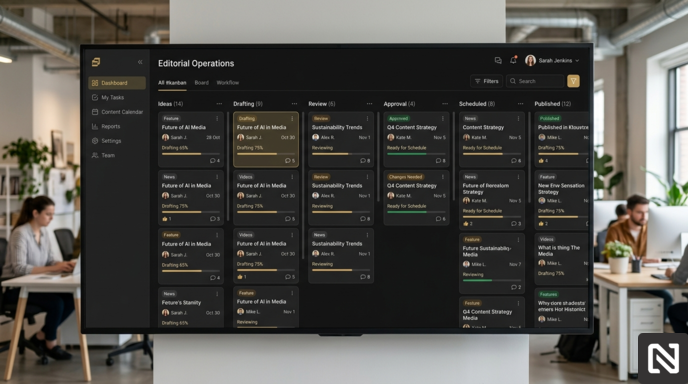
Quick answer: To choose an editorial workflow tool, start from how your content actually moves (stages, owners, approvers), then pick the lightest tool that enforces those stages. Small teams can manage with a project management board; teams with several reviewers, brands, or compliance steps usually need dedicated editorial workflow software.
Content teams rarely run out of ideas. What they run out of is a system that actually works.
Picture a typical week at a growing media company. A writer finishes a draft and emails it over. The editor leaves comments in Google Docs. The brand manager has revisions too, but she dropped them in a Slack thread nobody pinned. Someone misses a notification. The article sits untouched for three days. The publishing date passes quietly.
This is not a talent problem. It is a workflow problem. And it is precisely what editorial workflow tools exist to solve.
If you're new to the concept, read our guide on What Is an Editorial Workflow?
What Is Editorial Workflow Management Software?
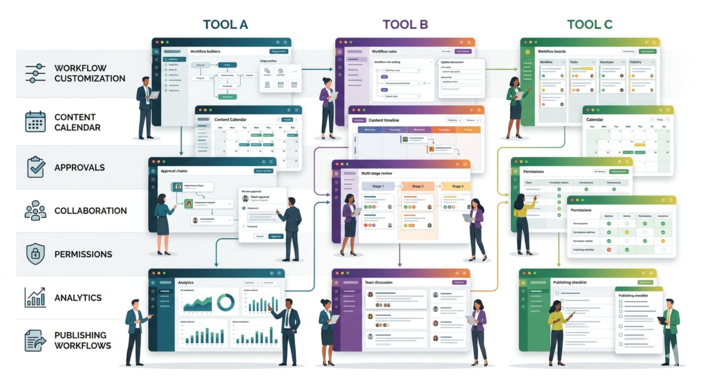
Editorial workflow management software is a platform that helps content teams move work from idea to publication through a structured, trackable process.
Instead of juggling email threads, shared drives, and scattered notes, your entire editorial workflow lives in one place. Every piece of content has a clear status, an assigned owner, and a defined next step.
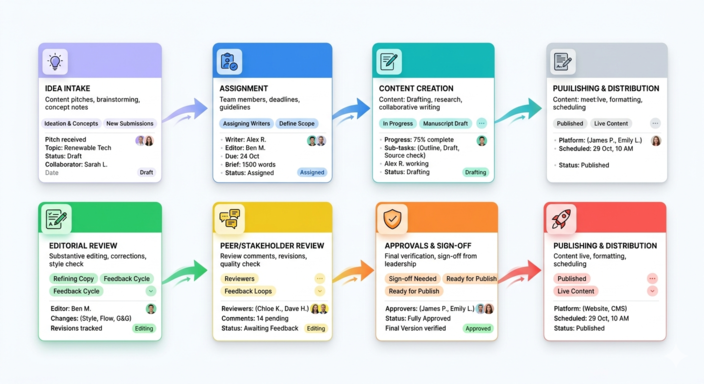
A typical workflow might look like this:
Idea generation → Assignment → Writing → Editing → Review → Approval → Publishing → Performance tracking
For teams publishing regularly, whether that is a daily newsletter, a brand blog, or a multi-publication media outlet, this kind of structure is not a luxury. It is the difference between a team that scales and one that constantly plays catch-up. For a deeper look at the category itself, see editorial workflow management software: what it is and how to choose.
Why Content Teams Actually Need This
Let us move beyond the theory for a moment.
The startup blog that grew too fast
A SaaS company launches a blog with two writers and a founder who edits everything. Google Docs and Slack work fine at first. Then they hire four more writers. Suddenly the founder is the bottleneck. Drafts pile up. Posts go live with errors because the review step got quietly skipped. A proper content workflow software tool would have given each draft a checklist and routed it automatically to the right person at the right time.
The agency managing multiple clients
A content agency handles editorial for six different brands. Each has its own tone, approval chain, and publishing calendar. Without dedicated publishing workflow tools, it becomes easy to lose track of which draft belongs to which client or, worse, to publish the wrong version. A structured editorial platform keeps everything cleanly separated.
The enterprise team with a compliance requirement
A financial services company produces educational content that must pass through legal review before it goes live. Without enforced approval workflows, teams skip that step under deadline pressure. Editorial process management software makes legal sign-off a required stage, not an optional one.
Signs You Have Outgrown Your Current Setup
Most teams do not adopt editorial workflow tools because they plan ahead. They adopt them because something broke.
Here are the warning signs to watch for:
- Deadlines slip and nobody is quite sure why.
- Writers frequently ask about the status of their submitted work.
- Editors cannot tell which version of a document is the most recent one.
- Approvals stall because requests get buried in inboxes.
- Your content calendar is a spreadsheet that is always slightly out of date.
- It takes five different tools to manage a single article from pitch to publish.
If three or more of those feel familiar, it is time to look at dedicated editorial workflow management software.
We covered the most common causes in our guide on how to reduce publishing bottlenecks for large content teams.
Key Features Worth Paying For
Not every tool in this space is built the same way. Here is what actually matters when you compare platforms.
Workflow customization
Your editorial process is specific to your team. The software should adapt to you, not the other way around. Look for platforms where you can define the exact stages content moves through, whether that is Draft → Peer Review → Editor → Legal → Published or something leaner.
Clear content assignment
Every piece of content should have one owner at any given stage. Ambiguity here is where deadlines go to die. The right editorial workflow tool makes ownership and due dates clear to everyone on the team.
Multi-stage approval workflows
Sequential approval chains are essential for teams whose content needs to pass through several reviewers, including a senior editor, a department head, and a compliance officer. Without them, reviewers skip steps or do them in the wrong order. Our content approval workflow best practices guide covers how many approvers you actually need.
Real collaboration features
Comments, mentions, revision history, and threaded discussions reduce the back and forth that otherwise happens over email. The best content workflow software keeps all feedback attached to the content itself, not scattered across three different communication tools.
A proper content calendar
A spreadsheet pretending to be a content calendar stops working the moment your publishing volume grows. A built-in calendar that updates in real time as content moves through stages makes planning genuinely possible.
Role-based permissions
Restrict access based on team roles. Writers should not accidentally publish. Clients reviewing a draft should not be able to delete it. Permissions matter more than most teams realise until something goes wrong.
Reporting that reveals bottlenecks
Where does content slow down most often? Which approval stage creates the most delays? Effective publishing workflow tools surface this data automatically. Teams that use it tend to catch process problems early, before they become publishing disasters.
Types of Editorial Workflow Tools
Project management platforms
Tools like Asana, Trello, and ClickUp provide flexible task management that you can adapt for content workflows. They are a solid starting point for small teams, but they were not built with editorial operations in mind. You will spend time customising them, but you will still miss some content-specific features, such as revision tracking and approval chains.
Knowledge management tools
Notion is a popular choice for teams that want a flexible all-in-one workspace. It is particularly well-suited for documentation and planning. As a dedicated editorial process management tool though, it requires significant setup and does not offer native publishing integrations or structured approval workflows out of the box.
Dedicated editorial platforms
Tools like Narranta, Planable, GatherContent, and CoSchedule specifically support content operations. They typically include content calendars, role-specific views, approval workflows, and integrations with CMS platforms. These are the right choice for teams where content is a core business function, not a side project.
Editorial Workflow Tools Compared by Type
The table below compares the three types on the things that usually decide the choice. It compares categories, not individual products, because features inside each category change quickly and vary by plan.
What you need | Project management (Asana, Trello, ClickUp) | Knowledge tools (Notion) | Dedicated editorial platforms (Narranta, GatherContent, CoSchedule, Planable) |
|---|---|---|---|
Custom workflow stages | Yes, as board columns | Yes, as database properties | Yes, built around content stages |
One owner per stage | Possible, by convention | Possible, by convention | Usually built in |
Enforced approvals | Weak, a column can be skipped | Weak | Usually enforced as a required stage |
Feedback on the draft | Comments on the task, draft lives elsewhere | Comments on the page | Comments on the content itself |
Revision history | Limited | Page history | Usually built in |
Content calendar | Calendar view of tasks | Calendar view of a database | Calendar tied to workflow status |
Publishing | Separate CMS needed | Separate CMS needed | Built in or connected to a CMS |
Setup effort | Low to start, grows with customisation | Medium | Medium, less ongoing upkeep |
Best fit | Small teams, simple approvals | Planning-heavy teams | Teams with several reviewers or brands |
The pattern is consistent: general tools let you describe a workflow, while dedicated editorial tools enforce one. If your process depends on people remembering a step, that difference matters.
Three Real-World Setups, and What Each Should Choose
A four-person startup blog publishing weekly
One founder approves everything, there is no legal step, and the main problem is remembering who is writing what. A Trello or Asana board with columns for Idea, Drafting, Editing, and Scheduled is usually enough. Do not buy an editorial platform yet. Revisit when the founder becomes the queue, which tends to happen around the third or fourth regular writer.
A twelve-person marketing team with product and brand review
Every article goes through an editor, then a product marketer for accuracy, then brand. Drafts live in Google Docs and approvals happen in Slack, so nobody can tell whether brand has signed off. This team needs one owner per stage, review deadlines, and approval as a visible stage. This is the point where dedicated editorial workflow software starts paying for itself.
An agency running content for several clients
Each client has its own approver, tone guide, and calendar, and the agency cannot afford a draft for one client ending up in front of another. Separation matters more than anything here: separate workspaces or publications, separate permissions, and a client-facing review step that does not expose internal comments. A dedicated editorial platform with multi-brand support is the only category that does this cleanly.
How to Choose the Right Platform
Here are the questions worth working through before you commit to anything.
How large is your team and how fast are you growing?
A team of three can use almost anything. A team of thirty needs structured permissions, clear ownership, and reporting that does not require manual data entry.
How complex is your approval process?
If content only needs one person to sign off, most tools will work. If it needs to pass through five departments, look for platforms that support sequential approvals and can enforce them.
How many publications or brands do you manage?
If you are operating more than one content property, make sure the software keeps them truly separate with their own workflows, calendars, and access controls.
Does it integrate with your existing stack?
The best content workflow software connects to the tools your team already uses: your CMS, your Slack workspace, and your analytics platform. Standalone tools that do not integrate become silos.
Will your team really use it?
Adoption is the graveyard of workflow software. A beautiful platform nobody uses is worse than a simple one everyone does. Look for tools with low setup friction and run a pilot with one team before rolling it out company-wide.
Map Your Workflow Before You Open a Single Demo
Most teams start a tool search by booking demos. That is backwards. A demo shows you the vendor's ideal workflow, and it is very easy to leave the call wanting a process you do not have.
Before you look at any tool, take the last three articles your team published and write down every step each one actually went through: who touched it, in which tool, and how long it waited between steps. You will usually find two things. First, the real workflow has one or two steps that are not on anyone's diagram, such as a product manager who quietly checks every post. Second, most of the elapsed time was waiting, not working.
That list becomes your requirements. If the slowest wait was approval, prioritise enforced approval stages. If it was writers not knowing their draft came back, prioritise notifications and visible status. If you need a starting structure, the editorial workflow template is a good base to adapt.
A Quick Evaluation Checklist
Before making a final decision, run any platform through these criteria:
- Workflow stages can be customised to fit your processes.
- Content assignments include clear owners and deadlines.
- Approval workflows are structured and enforceable.
- Collaboration features keep feedback attached to the content itself.
- Content calendar updates in real time as statuses change.
- Role-based permissions prevent both unauthorised access and accidental publishing.
- Reporting identifies bottlenecks without requiring manual tracking.
- The platform can scale as your team and output grow.
- On-boarding is straightforward enough that adoption will not be a battle.
And three questions to ask in every trial, with a real article rather than demo content: can a writer see, without asking anyone, what is happening to their draft? Can an approver sign off without leaving the tool? Can the editor tell in ten seconds which articles are late?
Common Mistakes When Choosing Editorial Workflow Tools
The most common mistake is copying an enterprise workflow too early. A six-person team that sets up seven review stages has not built quality control. It has built a queue.
The second is choosing the tool managers like rather than the one writers will use. If submitting a draft takes more clicks than emailing it, writers will email it, and the tool becomes a record of what someone remembered to update.
The third is migrating everything at once. Move one publication or one content type first, run it for a month, and fix the workflow before the rest of the team joins. Editorial workflow automation can come after the basic stages work, not before.
Where Narranta Fits
Every scenario above comes down to the same question: can everyone see where an article is and who has it? Narranta is built around that question. An article moves from idea, to draft, to review, to approval, to published, with the owner and status visible at every stage. Feedback stays on the draft, approval is a stage in the workflow rather than an email, and teams running several publications keep each one separate. You can see how the stages work on the editorial workflow software page.
Frequently Asked Questions
What are editorial workflow tools?
Editorial workflow tools are software that help content teams move articles through defined stages, such as drafting, editing, review, approval, and publishing, with a clear owner and status at each stage.
What is the best editorial workflow tool for a small team?
For a team of two to four people with one approver, a project management board such as Trello or Asana is usually enough. Dedicated editorial software becomes worth it once you have several reviewers, brands, or a compliance step.
Can I use Notion as an editorial workflow tool?
Yes, for planning and tracking. Notion does not enforce approval stages or publish content, so teams that rely on it usually add a CMS and a set of team conventions on top.
What is the difference between editorial workflow software and a CMS?
A CMS stores and publishes content. Editorial workflow software manages how the content gets ready to publish: assignments, reviews, approvals, and deadlines. Some platforms, including Narranta, do both.
How long does it take to switch editorial workflow tools?
For a small team, a pilot can run in a week or two. Plan for a month with one team or publication before moving everyone, so you can fix the workflow before it is copied across the company.
Your Process Is Your Product
A great editorial team with a broken workflow will always underperform. A good editorial team with a great workflow will consistently punch above their weight.
The tools your team uses every day shape how they think, how they communicate, and how much they can realistically produce. Choosing the right editorial workflow management software is not just an operational decision. It is a creative one. Pick the tool that matches the workflow you actually run, not the one you wish you had.
Streamline Editorial Approvals Before the CMS
Want a smoother path from draft to publication? Narranta helps content teams manage editorial workflow and approvals before content reaches the CMS. Try Narranta with your team.