
Most content teams don't fail because they run out of ideas. They fail because every article turns into its own small project, with its own deadlines, its own reviewers, and its own version of "wait, who's approving this?"
Here's what that usually looks like in practice. A writer finishes a draft on Monday. The editor leaves comments in Google Docs on Wednesday. Marketing asks for SEO changes over Slack on Friday. By the time everyone's weighed in, nobody's entirely sure which document is actually the latest one, and the article that was supposed to publish two weeks ago is still sitting in someone's "to review" folder.
An editorial workflow template fixes this not by adding more processes but by giving every article the same predictable path to follow. Instead of reinventing the process each time, teams work from a structure that already answers the question of what happens next.
Whether you run a company blog, a digital publication, an agency, or an enterprise content operation, the right template turns publishing from something that depends on who happens to be paying attention that week into something the whole team can rely on.
In this guide, you'll learn what an editorial workflow template actually is, which stages it should include, practical templates for different types of teams, and how to adapt one without overbuilding it.
What Is an Editorial Workflow Template?
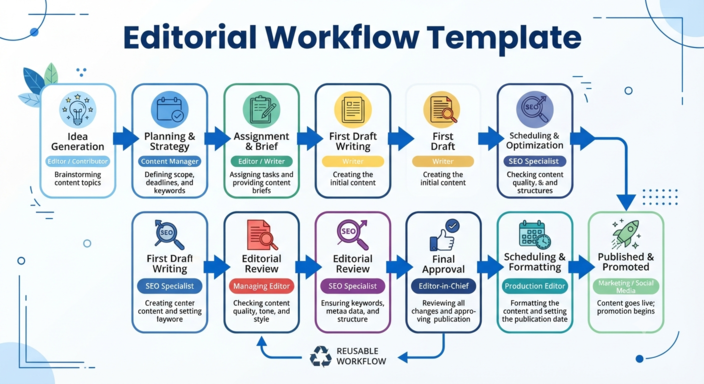
An editorial workflow template is a repeatable process that defines how content moves from idea to publication, including the stages, the people responsible, and the approval steps involved.
A template typically includes workflow stages, assigned roles, approval checkpoints, publishing deadlines, and a way to track where each piece of content currently stands.
Unlike a project plan built for a single article, a template is reusable. Every new piece of content starts from the same framework, which is really the whole point: it lets teams scale up without someone having to redesign the process every time headcount grows.
If editorial workflows are new territory for you, it's worth starting with What Is an Editorial Workflow? A Practical Guide for Content Teams, which covers the principles behind structured publishing in more depth.
Why Every Content Team Needs a Workflow Template
As publications grow, informal coordination stops working, usually faster than anyone expects. A workflow template solves most of what breaks down along the way.
The biggest benefit isn't really speed. It's knowing what's happening. Editors know exactly what needs review, writers know what's expected of them before they start, and managers stop chasing status updates across five different tools just to answer a simple question like, "Is this ready yet?"
That shift shows up in a few concrete ways. New contributors pick up the workflow almost immediately, because expectations are already documented instead of passed along informally over a Slack thread. Responsibilities are clearly assigned, so reviews and approvals stop stalling on the question of whose job it actually is. And the same template can support five articles a month or fifty, which matters more than it sounds like it should once a team starts scaling content production.
The Core Stages Every Editorial Workflow Template Should Include
Workflows vary between organisations, but most successful editorial templates draw from a similar set of core stages.
Stage | Purpose | Owner |
|---|---|---|
Idea | Capture content opportunities | Content Manager |
Planning | Research and define objectives | Content Manager |
Assignment | Allocate work | Editor |
Drafting | Create the article | Writer |
Editorial Review | Improve quality and structure | Editor |
SEO Review | Optimise for search | SEO Specialist |
Approval | Final review | Managing Editor |
Scheduled | Assign publication date | Publisher |
Published | Release content | Publisher |
These stages give most content teams a strong starting point to build from.
Treat this as a starting point, not a checklist to copy exactly. Most teams end up cutting or combining a few of these stages once they see what actually applies to them.
Example: A Real Editorial Workflow Template
Put together, a fuller version of the workflow looks something like this:
Content Idea → Content Brief → Writer Assignment → Draft → Editorial Review → SEO Optimisation → Final Approval → Scheduled Publication → Performance Review
The final stage is the one most templates leave out entirely: performance review. It closes the loop between what you publish and what you create next.
Editorial Workflow Template for a Startup Blog
A three-person startup publishing weekly thought leadership content almost certainly doesn't need six approval stages. It just needs enough structure that the founder isn't the only person who knows what's happening.
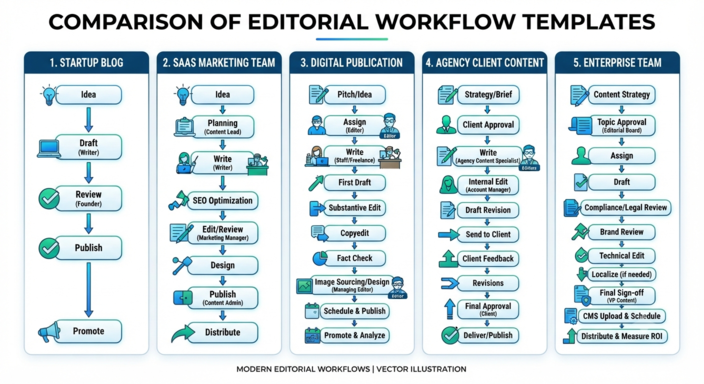
Idea → Brief → Draft → Founder Review → Publish
That's usually the whole workflow: a founder, a writer, and an editor, moving fast without a formal approval chain slowing things down. The moment this team starts adding stages just because "that's how bigger companies do it", they've usually created a bottleneck rather than solved one.
Editorial Workflow Template for a SaaS Marketing Team
Marketing teams carry more contributors and need tighter alignment with active campaigns, so their workflow earns a bit more structure than a startup's does:
Content Idea → Keyword Research → Content Brief → Writing → Editorial Review → SEO Review → Marketing Approval → Scheduling → Publish
A typical team here includes a content manager, writer, editor, SEO specialist, and marketing manager. The extra stages exist for a reason: SEO review protects search performance, and marketing approval keeps content aligned with whatever campaign it's supporting, rather than publishing in isolation from everything else the team is running.
Editorial Workflow Template for a Digital Publication
Publications producing content at a higher frequency need editorial stages that are clearly defined and consistently enforced, since volume alone makes it easy for standards to slip:
Pitch → Assignment → Draft → Editorial Review → Fact Checking → Copy Editing → Approval → Publication
Fact checking and copy editing earn their place here specifically because publications live and die by accuracy and polish. Cut those stages to save time, and it tends to show up in corrections later.
Editorial Workflow Template for an Agency
Agencies carry a layer of complexity that in-house teams mostly avoid: every client has different expectations, and every client wants to see the work before it goes live.
Client Brief → Planning → Writing → Internal Review → Client Review → Revision → Approval → Publication
Internal review exists to catch problems before the client ever sees them. Skip it, and client review turns into your quality control process by accident, which is a much more expensive way to find a typo.
Editorial Workflow Template for Enterprise Teams
Larger organisations need governance, and the workflow tends to reflect it. A healthcare company publishing product content, for example, usually needs medical review before legal sign-off because subject matter experts catch compliance issues earlier and cheaper than legal does:
Content Request → Planning → Writing → Editorial Review → Subject Matter Review → Legal Review → Compliance Approval → Executive Approval → Scheduling → Publication
It's a long chain, and it should feel like one. Every stage here exists to reduce the chance of an expensive mistake, whether that's a regulatory fine, a brand misstep, or a department finding out about published content after the fact.
The Workflow Stage Most Teams Forget
Every template above ends at publication, which is exactly where most teams stop thinking about the workflow too. That's a mistake.
Publishing isn't the finish line. It's the point where you actually find out whether the content works. Teams that treat "published" as the last stage rarely go back and look at what happened next: which articles brought in traffic, which ones stalled, which ones need an update six months later because the product changed underneath them. A workflow that ends at publish has no mechanism for feeding any of that back into what gets written next.
A stronger version of the workflow adds one more stage after publication: performance review. Not a full analytics deep dive for every article, just a scheduled check-in, 60 or 90 days out, to ask whether the piece is doing what it was supposed to do. If it's ranking and converting, leave it alone. If it's flat, that's useful information for the next planning cycle, not a dead end.
This is also where content refresh and repurposing decisions get made: turning a strong article into a shorter social post, updating a piece whose statistics have gone stale, or retiring content that never found an audience. None of that happens if the workflow treats publish as the end of the story.
How to Customise Your Workflow Template
No single workflow fits every organisation, so before adapting one of the templates above, it's worth thinking through team size, publishing frequency, industry regulations, number of reviewers, content types, and approval requirements.
One of the more common mistakes teams make is copying an enterprise-style workflow far too early. A five-person startup doesn't need seven approval stages. Complexity can feel professional, like a sign the team has "grown up", but in practice it usually just creates a bottleneck where none needs to exist. Start simple, and only add a stage once it's solving a problem you've actually run into, not one you're anticipating might show up someday.
Common Mistakes When Using Workflow Templates
Even a well-designed template can lose its value if it's implemented poorly.
Every additional stage adds time to the publishing process, so it's worth keeping workflows as lean as they can be while still doing their job. Ownership is another common failure point: every stage needs one clearly responsible person, because shared ownership sounds collaborative in theory but tends to produce delays in practice, since everyone quietly assumes someone else has it covered.
It also helps to treat the workflow as something you revisit, not something you set once and forget. If articles keep getting stuck at the same stage, that's usually a sign the process needs adjusting, not a sign the team needs to work harder. And it's worth resisting the urge to repurpose a generic project management template for this. General task tools rarely reflect what editorial work actually needs: stage-specific approvals, version history, and a clear line of sight into where content stands in its lifecycle.
Where Narranta Fits In
The real problem most teams run into isn't that they have no workflow. It's that their workflow is scattered across half a dozen tools. Ideas live in a spreadsheet somewhere. Feedback lives in Google Docs comments. Approvals happen over Slack, in a thread that gets buried by lunchtime. Nobody has one place to look and actually see the whole pipeline.
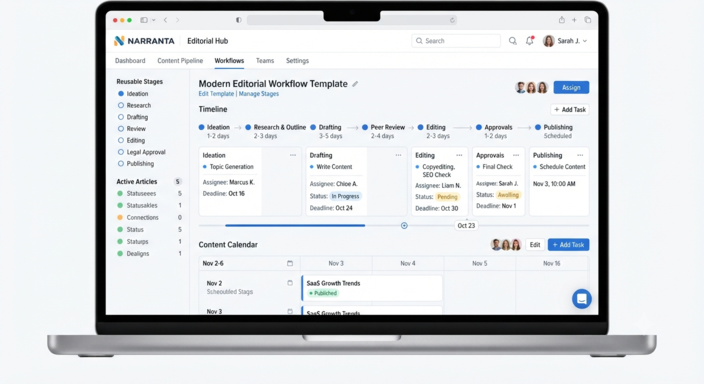
Narranta replaces that fragmented process with a single editorial workspace, where an article moves from idea to draft to review to approval, with ownership and status visible at every stage instead of the team rebuilding the workflow by hand every single time. The process lives in one place instead of getting reconstructed from memory every time someone asks, "Where's this article at?" And because every organisation publishes a little differently, the workflow itself can evolve as a team's content operation grows, without turning into another system nobody actually checks.
Frequently Asked Questions
What should an editorial workflow template include?
A good editorial workflow template should include content stages, owners, deadlines, review steps, approval checkpoints, and a way to track progress.
How many stages should an editorial workflow have?
Most teams need between five and nine stages. The right number depends on team size, publishing frequency, and approval requirements.
Is an editorial workflow the same as a content calendar?
No. A content calendar shows what content is planned and when it will publish. An editorial workflow shows how that content moves through production.
Building a Workflow That Grows With Your Team
An editorial workflow template is more than a checklist. It's the structure a scalable publishing operation gets built on, and it's usually the difference between a content team that grows smoothly and one that starts missing deadlines the moment headcount doubles.
The best workflow template isn't the most detailed one. It's the one your team will actually follow on a Tuesday afternoon when things are busy, not just the one that looks thorough in a planning document.
As your content operation grows, the workflow should grow with it: just enough structure to protect quality without slowing down the work that made the content worth publishing in the first place.