

Content teams eventually hit the same problem. Spreadsheets stop scaling, Slack threads become decision logs, and nobody is fully sure what stage a piece of content is actually in.
This is where editorial workflow management software comes in.
It is not just another project management tool. It is a system designed specifically for planning, assigning, reviewing, approving, and publishing content in a structured way.
In this guide, you will learn what editorial workflow management software actually is, what features matter, and how to choose the right platform for your team.

What Is Editorial Workflow Management Software?
Editorial workflow management software is a tool that helps content teams manage the entire lifecycle of content creation.
It connects every stage of publishing into a single system:
- Content ideation
- Assignment
- Drafting
- Editing
- Review and approval
- Scheduling
- Publishing
Instead of managing content across multiple tools, teams can use a single, centralised system to track everything.
The goal is simple:
Make content production predictable, visible, and scalable.
Why Content Teams Need Workflow Management Software
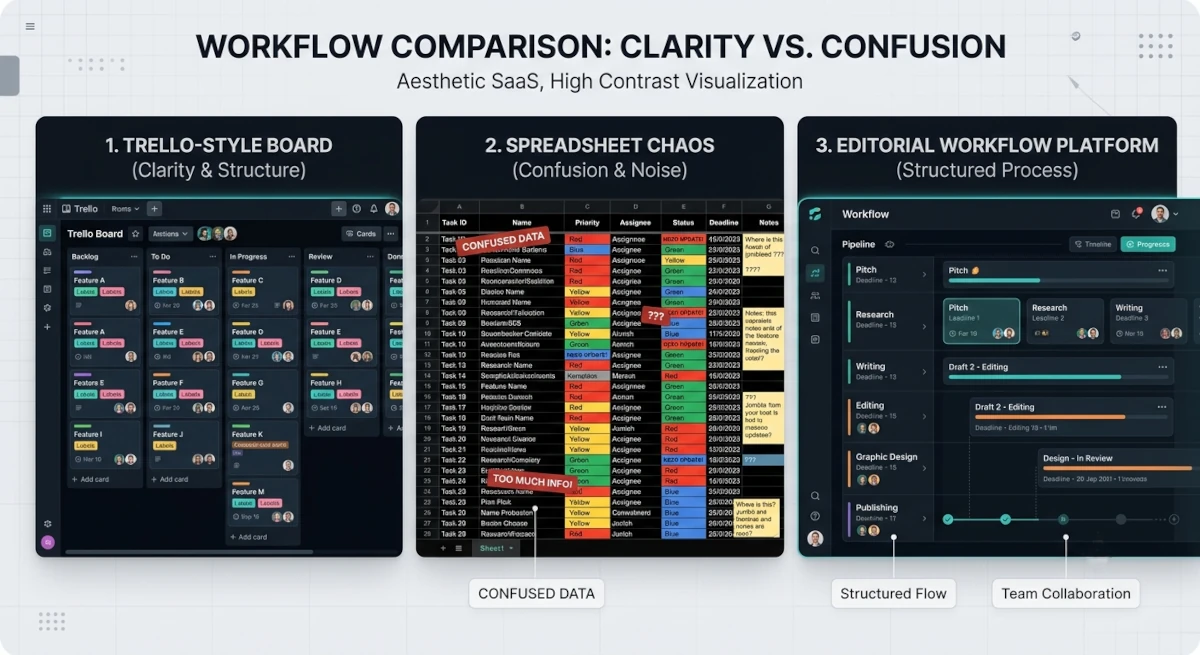
Most teams do not start with dedicated software. They start with tools like the following:
- Google Sheets
- Notion
- Trello
- Email chains
- Chat apps
These work in the beginning. But as soon as a team grows, problems appear.
1. Lack of visibility
No one knows what stage content is in. Writers think editors are reviewing. Editors think writers are still drafting.
2. Approval delays
Content remains stuck waiting for feedback, but no one can see where the bottleneck is.
3. Missed deadlines
Without structured tracking, deadlines become suggestions instead of commitments.
4. Fragmented communication
Feedback is scattered across email, chat, and documents.
5. Scaling issues
What works for 2 people breaks down completely with 5 to 10 contributors.
Workflow software solves these problems by creating a single source of truth.
Key Features of Editorial Workflow Management Software
Not all tools are built the same. The best platforms share a set of core features.
1. Workflow Stages
A clear structure for how content moves from idea to publication.
Typical stages include the following:
- Idea
- Assigned
- Drafting
- Editing
- Review
- Approved
- Scheduled
- Published
2. Task Assignment
Every piece of content should have:
- A writer
- An editor
- Optional reviewers
This removes ambiguity around ownership.
3. Approval System
Approvals are one of the biggest bottlenecks in content operations.
Good software allows the following:
- Multi-step approvals
- Conditional approvals
- Approval tracking
4. Content Calendar
A visual way to see all upcoming and published content.
This helps teams:
- Plan campaigns
- Balance workloads
- Avoid publishing gaps
5. Collaboration Tools
Modern editorial workflows require collaboration inside the platform:
- Comments on drafts
- Inline feedback
- Version history
- Mentioning teammates
6. Automation
Automation reduces repetitive manual work, such as the following:
- Moving content between stages
- Sending review notifications
- Assigning reviewers automatically
7. Analytics and Reporting
Teams need to understand the following:
- How long content takes to publish
- Where delays happen
- How many pieces are completed on time
Without this information, workflows cannot be improved.
Editorial Workflow Software vs General Project Management Tools
Many teams try to use tools like Trello or Asana for content workflows.
While they can work, there are key differences.
Feature | Project Management Tools | Editorial Workflow Software |
|---|---|---|
Content stages | Generic | Built for publishing lifecycle |
Approvals | Basic | Structured and multistep |
Content calendar | Limited | Core feature |
Publishing workflow | Missing | Fully integrated |
Content collaboration | Generic | Editorial focused |
Project management tools are flexible, but editorial software is purpose-built.
How to Choose the Right Editorial Workflow Platform
Choosing the right tool depends on your team structure and publishing needs.
1. Team Size
Small teams need simplicity.
Larger teams need structured workflows, permissions, and approvals.
2. Content Volume
If you publish occasionally, basic tools are enough.
When you publish daily or weekly, automation and tracking become essential.
3. Workflow Complexity
Ask yourself:
- Do we need multiple approval stages?
- Do we have different content types?
- Do we need role-based permissions?
More complexity means you need more advanced software.
4. Collaboration Needs
If multiple writers, editors, and stakeholders are involved, you need strong collaboration features.
5. Integration Needs
Check if the platform integrates with:
- CMS systems
- SEO tools
- Analytics tools
- Publishing platforms
6. Reporting Requirements
If you care about performance metrics, choose a tool with workflow analytics.
Common Mistakes When Choosing Workflow Software
1. Choosing based on popularity instead of fit
Just because a tool is widely used does not mean it fits editorial workflows.
2. Overcomplicating the system
Adding too many stages or rules slows down publishing instead of improving it.
3. Ignoring adoption
If the tool is difficult to use, your team will not use it consistently.
4. Treating it like a storage tool
Workflow software is not just for storing content. It is for managing movement and decisions.
How Narranta Fits Into Editorial Workflow Management
Most tools force teams to adapt their workflow to the software.
Narranta is designed around editorial workflows from the start.
Teams can:
- Define content stages
- Assign writers and editors
- Manage approvals
- Track publishing status
- Plan content in calendars
- Maintain full visibility across teams
Instead of combining multiple tools, everything lives in one system designed for publishing teams.
When You Know You Need Workflow Software
You have outgrown spreadsheets or basic tools if:
- You keep asking, "Who is reviewing this?"
- Content gets stuck in approval stages
- Deadlines are frequently missed
- You cannot see overall content progress
- Collaboration happens outside your system
At this point, workflow software is no longer optional.
Choosing the Right Direction
The best editorial workflow management software is not the one with the most features.
It is the one your team actually uses consistently.
Focus on:
- Simplicity
- Visibility
- Clear ownership
- Smooth approvals
- Reliable tracking
When these elements are in place, content production becomes predictable and scalable.
That is the real value of editorial workflow management software: it not only organises content, but also enables teams to publish consistently without chaos.
Streamline Editorial Approvals Before the CMS
Want a smoother path from draft to publication? Narranta helps content teams manage editorial workflow and approvals before content reaches the CMS. Explore Narranta at https://narranta.com, and consider a trial or demo for your team.