
The most common way an editorial workflow breaks isn't dramatic. It's an article sitting in "review" for three weeks because the writer thinks the editor has it, the editor thinks legal has it, and legal has never seen it. Nobody did anything wrong. Nobody is even lying to anyone. The work just fell into a gap that nobody was watching, and it sat there until someone finally asked, "Wait, where is this?"
That's editorial workflow management in a nutshell: not whether your team can write good content, but whether you can move it from idea to published without it disappearing into a gap like that one.
An idea needs a brief. Someone needs to own it. A writer needs a deadline. An editor needs to review the draft. SEO may need to check it. A stakeholder may need to sign off. Someone needs to schedule and publish it. Run that process across a shared doc, a spreadsheet, three Slack channels, and whatever email thread happens to have the latest version, and even a four-person team will lose track of something within a month.
Editorial workflow management is the system that keeps that from happening: a defined process for who does what, in what order, and what happens next. For a growing content team, the fix is rarely "add more process." It's usually "make the process that already exists actually visible."
What Is Editorial Workflow Management?
Editorial workflow management is the practice of planning, assigning, reviewing, approving, and publishing content through a defined, repeatable process.
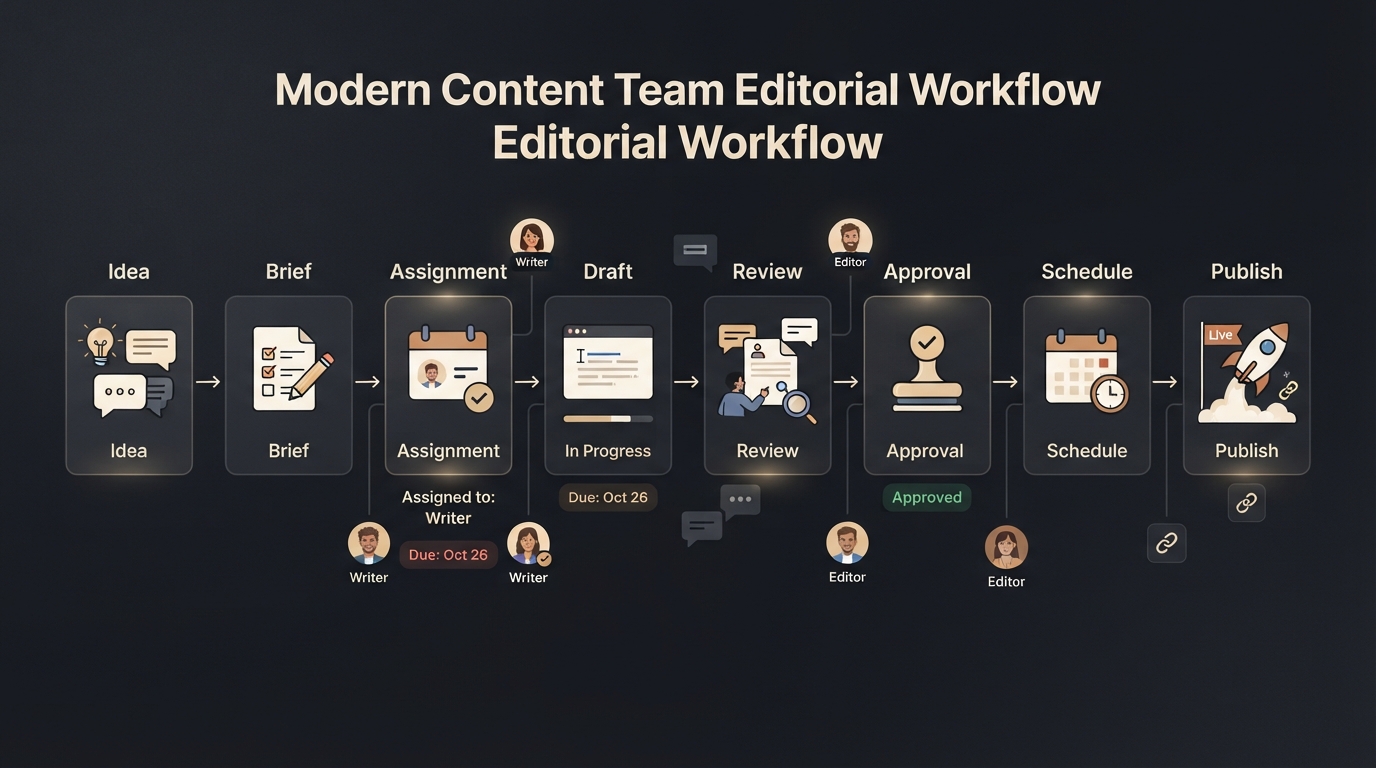
There's a useful distinction buried in that definition. An editorial workflow is the sequence of stages content moves through, something like idea, brief, assignment, draft, review, approval, schedule, and publish. Editorial workflow management is how the team actually runs that sequence: who owns each stage, when it's due, what has to happen before it moves forward, and what's currently stuck.
The stages tell you the shape of the process. Management is the part that answers the questions people actually ask day to day: who owns this, when is it due, what's blocking it, and has anyone approved it yet?
That distinction barely matters for a solo writer working out of a single document. It matters a lot once you've got a team of five splitting work across a spreadsheet, and it becomes unavoidable once you've got writers, editors, an SEO specialist, a designer, a marketing lead, and maybe an outside contributor or two all touching the same pipeline. At that size, "we have a content calendar" stops being an answer to "how's the work going?"
Why a Content Calendar Isn't Enough
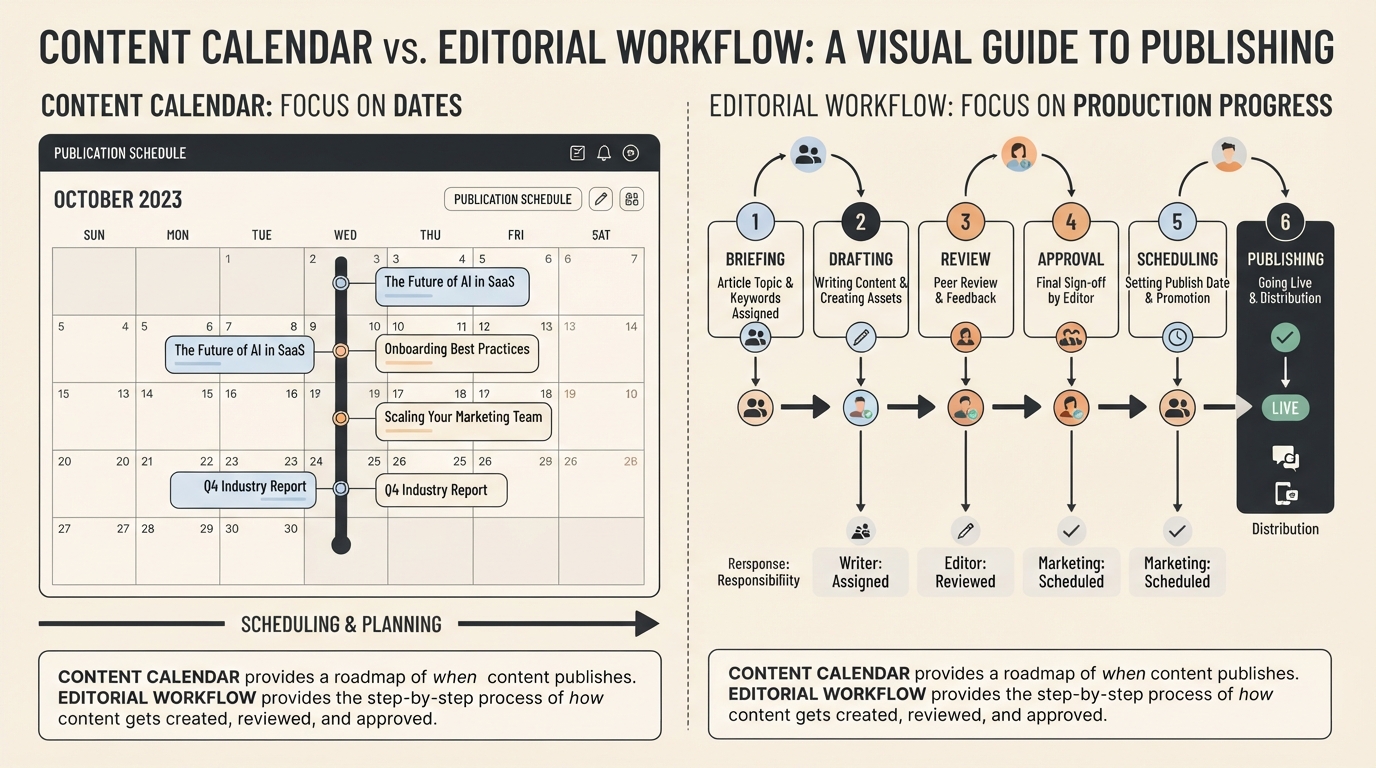
A calendar tells you what's supposed to happen. It doesn't tell you what's actually happening.
Say you're planning to publish ten articles this month. Your calendar shows Article A going out on September 10th, Article B on the 12th, and Article C on the 15th. Fine. But none of that tells you whether Article A has actually been assigned yet, whether the writer for Article B has started, whether Article C cleared SEO review, or who's currently sitting on an approval nobody's chased them for.
I've watched teams discover a missed deadline the same day it was supposed to publish, because the calendar looked fine right up until it didn't. The calendar isn't wrong, exactly. It's just answering a different question than the one that actually matters day to day, which is, where is each piece right now, and what's it waiting on?
Editorial workflow management connects those dots. Instead of a list of publish dates, the team sees the whole pipeline: what's drafted, what's stuck in review, and what's waiting on one person who's been out all week. That's what lets you catch a problem on Tuesday instead of discovering it on the day the article was due.
(For the underlying mechanics of how a workflow is structured stage by stage, see What Is an Editorial Workflow? A Practical Guide for Content Teams.)
The Main Stages of Editorial Workflow Management
There's no universal workflow. A newsletter team and a healthcare content team will structure this completely differently. But most editorial processes end up hitting the same handful of stages in some form.
Content planning. Before anyone writes a word, someone decides what needs to get made and why: topic, audience, search intent, format, priority, and target date. Skip this and writers end up getting handed a topic with no context, which almost always means a slower first draft and more revision later.
Briefing. The idea becomes something a writer can actually act on. A working title, the audience, the key questions the piece needs to answer, a rough structure, internal links to include, a deadline, and a named owner. A five-person team might do this in three sentences in a shared doc. A larger org might need a full template. Either way, the writer shouldn't be guessing at what "good" looks like for this piece.
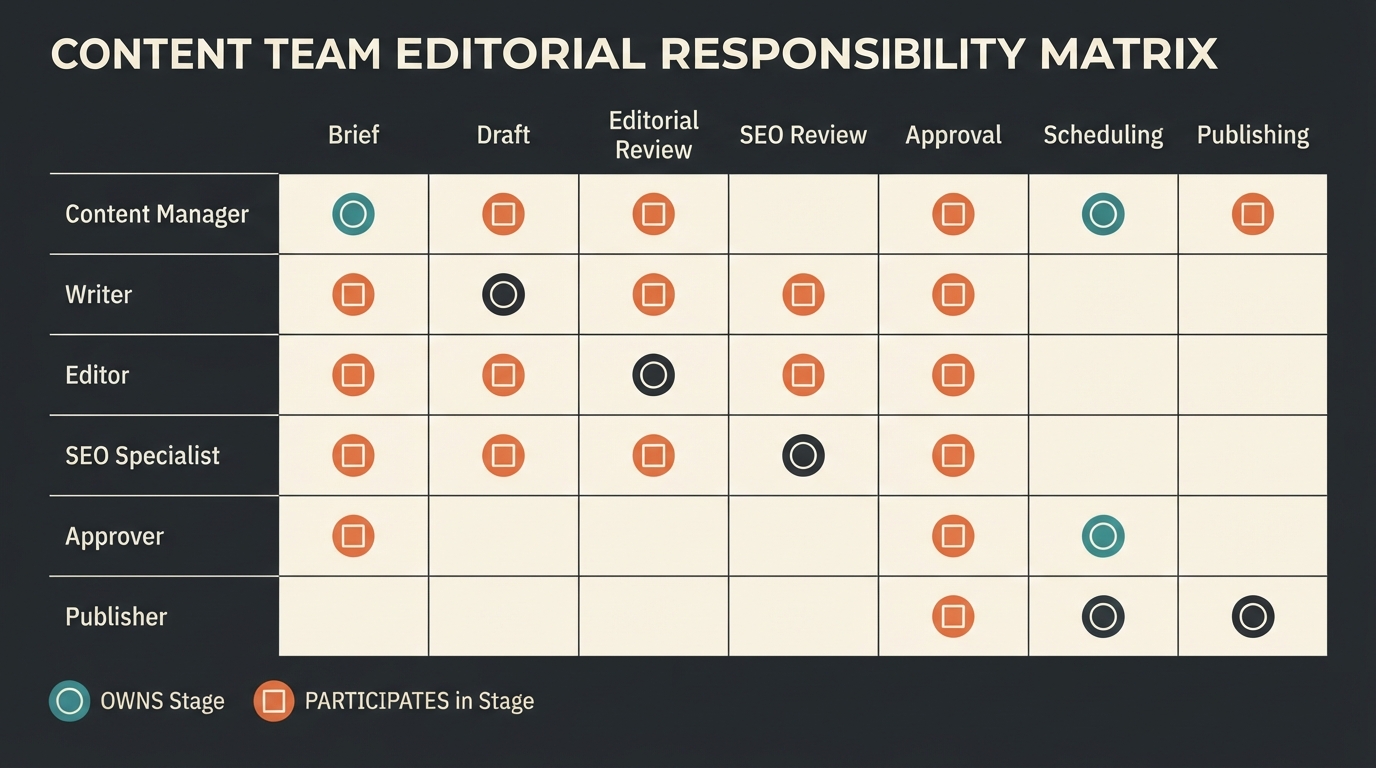
Assignment. This sounds too obvious to mention, but unclear ownership is one of the easiest ways for a piece to stall. Who's writing it, who's editing it, who reviews it, who approves it, who actually hits publish? None of these need to be the same person, but every one of them needs a name attached, because "the team" isn't an owner. A typical split looks like this:
Stage | Owner |
Brief | Content manager |
Draft | Writer |
Editorial review | Editor |
SEO review | SEO specialist |
Approval | Marketing lead |
Publishing | Publisher |
When every box has a name in it, nobody gets to assume someone else has it.
Drafting. Once the assignment is clear, the writer does the work, and the workflow should make that status visible without anyone having to ask. "Assigned" versus "drafting" versus "ready for review" is a small distinction that saves a manager from pinging a writer just to check in.
Editorial review. The editor is checking accuracy, structure, tone, and whether the piece actually delivers on the brief. This is also where things tend to go sideways, because feedback ends up scattered: a comment in the doc, another one in Slack, and a third one in an email nobody forwarded to the writer. The writer then has to go reconstruct what was actually asked of them before they can even start revising. Keeping feedback attached to the draft itself, rather than floating around three different tools, is one of the highest-leverage fixes a team can make here. (If review delays are a recurring pattern for your team, Content Workflow Bottlenecks: Causes and Fixes for Teams digs into this specifically.)
Specialist reviews. Not every piece needs these, but larger teams often layer in SEO review (keyword targeting, internal links, metadata), design review (images, layout), or legal review (claims, disclosures) depending on content type. The real question isn't whether your team should have these stages. It's whether the workflow makes clear which pieces actually need them, because running every blog post through legal review is how a two-day publishing cycle turns into two weeks.
Approval. Editing and approval aren't the same thing. An editor asks for changes. An approver confirms the piece is actually ready to go out the door. This can be one person or a small group, but the team should be able to answer "has this actually been approved" without digging through an inbox. (For teams juggling multiple approvers, a defined [content approval workflow](#) makes this a lot less painful.)
Scheduling. Once a piece clears review and approval, it moves into the publishing queue, connecting production to the actual calendar. What's ready, what's scheduled, where it's going out, and who's hitting publish.
Publishing and distribution. For some teams the workflow ends the moment the article goes live. For others it continues into newsletters, social media, repurposing, and reporting. There's no universally right answer here, but decide deliberately where your editorial workflow ends and where the next process picks up, rather than letting it drift.
A Week in the Life of a Real Workflow
Take a SaaS company publishing four articles a week. Monday, the content manager picks topics and writes briefs. On Tuesday, writers work on their assigned drafts. Wednesday, finished drafts move into editorial review. Thursday covers SEO and stakeholder review. Friday, whatever's cleared gets scheduled for the following week.
The specific days don't matter much. What matters is that if an article is still sitting in editorial review on Thursday afternoon, everyone already knows why it hasn't reached scheduling, without anyone needing to ask. That's the actual payoff of a workflow: catching the delay while there's still time to do something about it, instead of finding out on publish day.
The Stage Most Guides Skip: Deciding What Doesn't Need the Full Process
Most advice on this topic walks you through adding stages: more review, more approval, and more visibility. Almost nobody tells you when to take stages away, and that's usually the bigger unlock.
Not every piece of content needs the same workflow. A 600-word product update and a regulated healthcare article shouldn't be running through the identical five-stage approval chain, but I see teams do exactly that constantly, usually because it's easier to apply one process to everything than to maintain two. The cost shows up quietly: minor pieces take as long to publish as major ones, reviewers start rubber-stamping things they haven't actually read because they're reviewing too much low-stakes content, and the whole team starts treating "in review" as a formality rather than a real checkpoint.
The fix isn't complicated; it's just something teams rarely do on purpose: define two or three workflow tiers based on actual risk and stakes, not on habit. A quick internal blog post might go from writer to editor to publish. A pricing page change or anything making a legal claim gets the full chain. Most teams already sense this distinction informally. Very few write it down, which means it gets renegotiated every single time someone's unsure whether a piece "needs" the extra review. Writing it down once saves that argument forever.
How Workflow Management Heads Off the Usual Problems
A workflow doesn't just organize tasks; it removes a specific kind of uncertainty that eats a surprising amount of a manager's week.
Nobody knowing who owns an article stops being a problem; you solve it by sending a "hey, who's got this?" message, because the owner is just visible. Editors chasing writers for status updates goes away because the status is sitting right there instead of living in someone's head. Feedback stops scattering across five tools once comments stay attached to the draft they're about. Approval delays shrink once everyone can see who's actually signed off instead of guessing. And bottlenecks stop being something a manager discovers only after a deadline's already been missed, because the pipeline shows where work is piling up before it becomes a crisis.
That last one matters more than people give it credit for. A bottleneck is rarely the fault of whoever's currently holding the work. More often it's a review stage with one overloaded reviewer or three different teams all waiting on the same approver. You can't fix a pattern you can't see, and most teams without a real workflow can't see it until it's already cost them a deadline.
Common Mistakes Teams Make
Too many stages. A workflow with twenty statuses looks thorough on a whiteboard and becomes unusable in practice. If people need a legend to understand where a piece actually is, you've overbuilt it.
No owner on a stage. An unowned stage becomes a waiting room. Content collects there, and nobody feels responsible for moving it out.
One-size-fits-all review. Treating a quick update and a high-stakes piece identically, as covered above, is one of the more common ways teams slow themselves down without meaning to.
Splitting the workflow from the actual content. If a reviewer has to open three different tools to find the draft, the comments, and the approval status, the workflow is creating friction instead of removing it.
Automating the judgment calls. Automation is genuinely useful for repetitive mechanics, reminders, status changes, and routing. It's a mistake to lean on it for anything that actually needs a human's editorial judgment.
Never revisiting the workflow. A process built for three people doesn't automatically hold up for fifteen. Teams that never revisit their workflow tend to keep running a process designed for a team half their current size.
When Should a Team Actually Adopt This?
There's no headcount where this suddenly becomes necessary. A two-person team can get real value from a lightweight version of this. The actual signal isn't team size; it's coordination complexity.
You're probably past the point where a shared doc and good intentions are enough if multiple people touch every article, content regularly misses deadlines, review takes longer than it should, approvals happen over email, people are constantly asking for status updates, or several publications share the same pool of writers and reviewers. If none of that sounds like your team yet, a simple documented process is genuinely fine. The goal was never to process for its own sake. It's just enough structure that work keeps moving without someone having to chase it.
Where Narranta Fits In
Everything above, the scattered feedback, the invisible approvals, the bottleneck nobody sees until it's already cost a deadline, is exactly the gap Narranta was built to close.
Instead of splitting the work across a doc for drafting, a spreadsheet for status, Slack for feedback, and email for approvals, an article moves through Narranta from idea to draft to review to approval, with ownership and status visible at every stage. A reviewer's comments stay attached to the piece they're commenting on. An approver's sign-off is a record, not a message buried three days back in a thread. A manager can see, at a glance, exactly where every piece in the pipeline actually sits and what's blocking it.
It's not trying to replace every tool your content team already uses. It's meant to be the one place that shows what's happening to a piece of content before it's ready to publish, which is usually the part that's hardest to see anywhere else.
Frequently Asked Questions
What's the difference between an editorial workflow and editorial workflow management?
The workflow is the sequence of stages content moves through: idea to draft to review to publish. Workflow management is how the team actually runs that sequence day to day: ownership, deadlines, status, and what's currently blocked.
Is editorial workflow management the same as a content calendar?
No. A calendar shows planned publish dates. Workflow management shows the current status of the work itself, what's drafted, what's in review, what's approved, and what's stuck. See Editorial Calendar vs. Content Calendar: What Is the Difference? for a fuller comparison.
How many review stages should a piece of content go through?
That depends on the stakes, not on habit. A low-stakes update might only need one review. A piece making legal or medical claims might need three or four. The mistake most teams make is applying the same review depth to everything regardless of risk.
Do small teams need editorial workflow software?
Not necessarily. A two- or three-person team can often manage with a documented process and a shared doc. Software tends to earn its place once the number of contributors, reviewers, and simultaneous pieces makes manual tracking genuinely hard to keep in your head.
What usually causes editorial workflows to break down?
Most often it's an unowned stage, scattered feedback across too many tools, or an approval step nobody's actually watching. It's rarely a writing problem. It's almost always a visibility problem.
The Point of All This
Editorial workflow management isn't about adding rules. It's about making the process visible enough that nobody has to ask where something stands, because they can already see it.
A small team might get there with a few documented stages and clear ownership. A larger one will probably need dedicated software to track assignments, reviews, approvals, and deadlines without losing the thread. The right amount of structure depends entirely on how complex your coordination problem actually is, and it's worth being honest with yourself about which one you actually have.
But the underlying principle doesn't change with team size: a workflow's only job is to keep work moving without requiring someone to constantly go chase it down. If your team still needs a person whose real, unofficial job is "figure out where things are," the workflow isn't doing its job yet.